MPC Recruitment Outbound System
Multi-table Clay architecture that scrapes LinkedIn job postings, qualifies companies, finds decision makers based on company size, enriches contacts through a 5-provider email waterfall, generates personalized cold emails, and pushes campaign-ready data to Smartlead — with cache tables to eliminate duplicate enrichment across runs.
The brief
A fictional NYC recruitment agency cold emails hiring managers about their open software engineering roles, claiming to have a candidate who matches their requirements. The candidate description is generic but relevant enough to generate interest. After the prospect responds and signs, the agency kicks off the actual candidate search.
The system needs to handle the full pipeline: find relevant job postings, qualify companies, identify the right decision makers, enrich their contact details, generate personalized emails referencing the specific role, and export everything to both a Google Sheet (for the client to review) and Smartlead (for campaign execution). Credit conservation is critical since the pipeline needs to scale without burning through enrichment budgets on bad data.
Architecture overview
Five interconnected Clay tables, each with a specific role in the pipeline. Tables 3, 4, and 5 are cache tables that store previously enriched data so re-runs never pay for the same enrichment twice. The final output flows to Google Sheets and Smartlead.
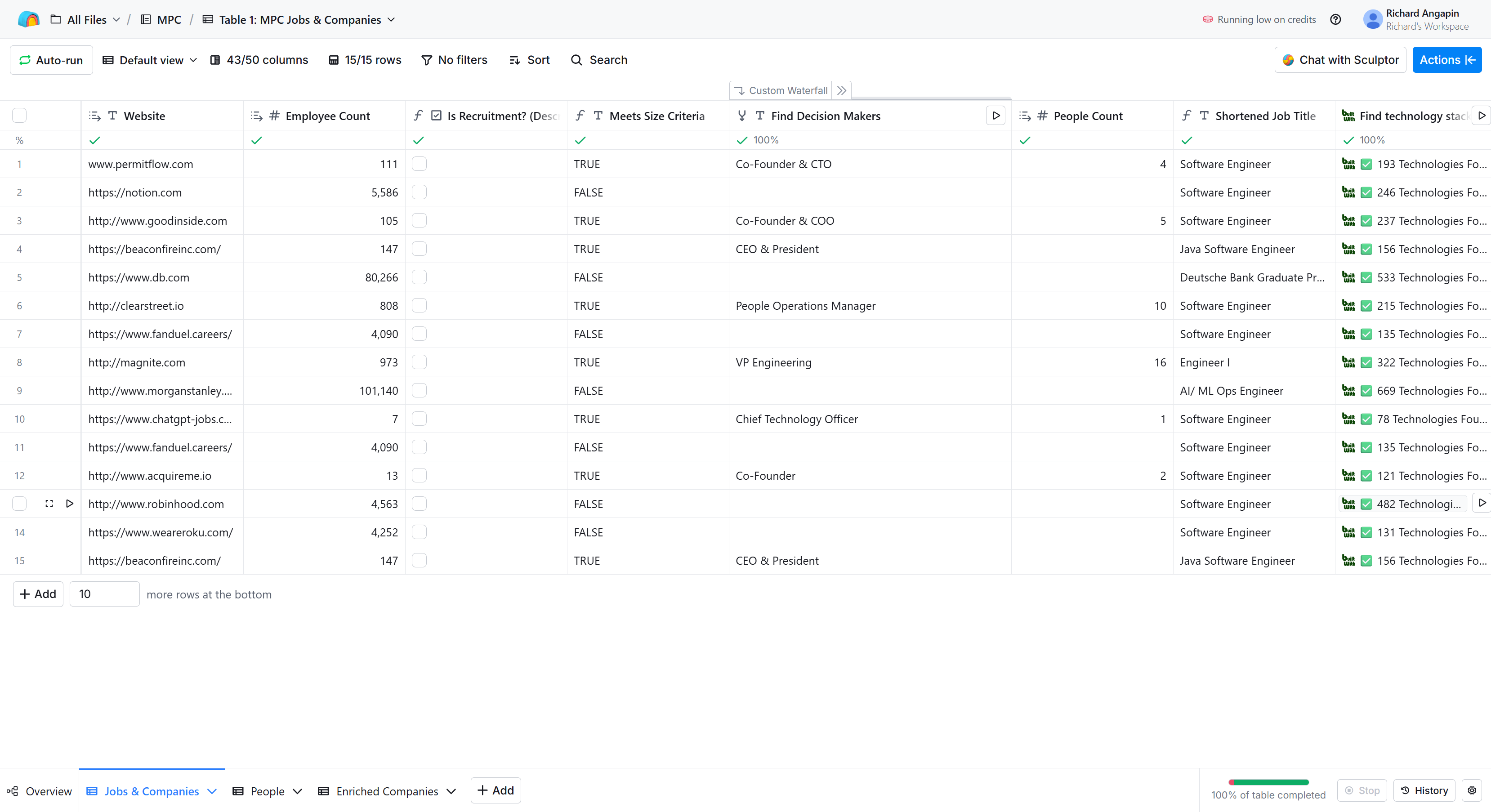
Table 1: Jobs & Companies — Ingests job postings, qualifies companies, enriches company data, finds decision makers, and extracts email variables from the job posting.
Table 2: People — Takes contacts from Table 1, runs email and phone enrichment through a waterfall, generates the personalized email body, and exports to Google Sheets and Smartlead.
Table 3: Enriched Companies — Cache. Stores company enrichment results keyed on company URL so Table 1 can skip enrichment for companies already processed.
Table 4: Cleaned Job Titles — Cache. Stores shortened job titles so the AI formula does not re-process titles it has already cleaned.
Table 5: Enriched People — Cache. Stores email and phone results keyed on LinkedIn URL so Table 2 can skip enrichment for contacts already processed.
Table 1: Jobs & Companies
Data source
Job postings come from an Apify LinkedIn Sales Navigator scrape (bebity/linkedin-jobs-scraper), imported as CSV. The scrape targets full-time software engineering roles in the New York Metropolitan area, covering keywords like Software Engineer, Data Engineer, DevOps, Software Developer, Data Analytics, and AI/ML Engineer.
Each row arrives with the job title, location, company name, company LinkedIn URL, job URL, sector, salary range, and experience level.
Company qualification
The first gate is a recruitment agency check. Before any paid enrichment runs, an AI formula classifies the company based on its name alone:
AI Formula prompt — recruitment detection:
You are classifying companies as recruitment/staffing firms or not.
Company name: {{companyName}}

A recruitment/staffing company is one whose primary business is placing
candidates at other companies. This includes staffing agencies, talent
acquisition firms, headhunters, employment agencies, and HR outsourcing
firms that focus on hiring.

It does NOT include:
- Software companies that happen to make HR/recruiting tools
- Consulting firms that do strategy or tech work
- Companies with "talent" or "people" in their name that are not
  staffing firms

Based ONLY on the company name, is this most likely a recruitment or
staffing company?

Return ONLY: TRUE or FALSE
The prompt is deliberately narrow. It only uses the company name, not the description or website, because this check runs before any enrichment. The exclusion rules matter: without them, companies like Greenhouse (ATS software) or BambooHR (HR platform) would get falsely flagged and never reach the pipeline.
For companies that pass, Clay's company enrichment pulls in the domain, employee count, industry, description, and other firmographic data. A formula then checks whether the employee count is 1,000 or below. Companies above that threshold get filtered out since the agency targets smaller organizations where outreach to leadership is more effective.
Companies like Notion (5,586 employees), Deutsche Bank (80,266), Morgan Stanley (101,140), FanDuel (4,090), Robinhood (4,563), and Roku (4,252) were all correctly filtered out by this gate. The companies that passed through included PermitFlow, Good Inside, Clear Street, Acquire Me, ChatGPT Jobs, and Magnite.
Cache logic
Before running company enrichment, Table 1 does a lookup against Table 3 (Enriched Companies cache) matching on company URL. If a match is found, the enrichment step does not run. After enrichment completes for new companies, a "Send table data" action writes the results back to Table 3 for future runs.
The same pattern applies to job title cleaning. Before the AI formula runs to shorten a job title, Table 1 checks Table 4 (Cleaned Job Titles cache). If the title has already been cleaned in a previous run, it pulls the cached result instead of spending credits on the AI formula.
Decision maker discovery
For qualified companies, a custom waterfall of 5 enrichment providers searches for decision makers. The targeting logic adapts based on company size:
- Companies with more than 400 employees: VP Engineering, Director of Engineering, and similar senior technical leadership.
- Companies with 400 or fewer employees: broader title set including CEO, Founder, Co-Founder, CTO, VP/Director of Engineering, and HR titles.
This distinction matters because at smaller companies, the hiring decision often sits with the founder or CTO, while larger companies have dedicated engineering leadership handling recruitment.
Email variable extraction
Once a company qualifies, several AI-powered columns extract the variables needed for the cold email. Each prompt is designed to produce clean, specific output that slots directly into the email template without manual editing.
Shortened Job Title — An AI formula strips seniority levels, qualifiers, and noise from raw LinkedIn job titles:
Clean this {{title}} to its core role name. Remove company names,
seniority prefixes like "Senior" or "Associate", team names, and
any extra qualifiers in parentheses or after dashes.

Examples:
"Software Engineer, Backend" -> "Software Engineer"
"Software Engineer (New Grads)" -> "Software Engineer"
"Senior Software Engineer, Games - Web Platform" -> "Software Engineer"
"Software Engineer L5 - Ads Engineering" -> "Software Engineer"
"Associate, Software Engineer" -> "Software Engineer"
"Junior Software Developer" -> "Software Developer"
"Staff Data Engineer" -> "Data Engineer"

Job title: {{title}}
With a conditional wrapper that checks the cache first:
If the Table 4 {{lookup result}} returned a result, use that value.
Otherwise, clean the job title by stripping seniority, team names,
and qualifiers.

Return ONLY the cleaned title, nothing else.
This two-layer approach means the AI formula only fires when the cache misses. "Engineer I, Applied LLM Team" becomes "Software Engineer." "Senior Full Stack Software Engineer" becomes "Full Stack Engineer."
Tech Stack — Enrichment pulls the technology requirements from the job posting. Results include specific stacks like React/TypeScript/Node, Flutter/Dart, Java/JEE/Angular, Hadoop/Spark, and C++/Linux.
Company Niche — The "similar industry" variable in the email. This prompt pushes for specificity rather than accepting generic labels:
Based on the {{companyName}} and {{description}} below, describe
this company's specific niche or space in 1-3 words. Be creative
and specific. Do NOT use generic terms like "software",
"technology", or "SaaS".

Think about what makes this company unique. What specific problem
do they solve or what specific market do they serve?

Examples:
Robinhood (democratizes finance) -> "fintech"
DoorDash (food delivery platform) -> "food delivery"
Nextdoor (neighborhood social network) -> "neighborhood networking"
Tecton (AI feature store) -> "ai infrastructure"
Kensho (AI analytics for finance) -> "ai solutions"
Loom (video messaging) -> "video communications"

do not include quotation marks
Company name: {{companyName}}
Company description: {{description}}

Return ONLY the specific niche label in lowercase, nothing else.
The examples in the prompt are critical. Without them, the AI defaults to vague labels like "technology" or "software platform." With the examples, it produces results like "construction compliance" (PermitFlow), "parenting empowerment" (Good Inside), and "capital markets platform" (Clear Street).
Key Responsibility — Generates a past-tense achievement statement that reads naturally as a candidate description in the email:
Based on this company description, write a single sentence
describing what a candidate working here would have accomplished.
Write it as a past achievement starting with "Has" as if
describing someone's experience.

Examples:
Robinhood (democratizes finance) -> "Has helped build secure
  systems that power financial products for millions of users"
Giga (voice AI for customer support) -> "Has built AI agents
  that handle complex customer support interactions at scale"
Canary Technologies (hotel software) -> "Has developed modern
  software solutions that improve hotel operations and guest
  experiences"

Company name: {{companyName}}
Company description: {{description}}

Return ONLY the sentence starting with "Has", nothing else.
This is one of the more nuanced prompts in the system. The output needs to be vague enough to describe a fictional candidate (the agency does not actually have someone lined up) but specific enough to the company's domain that it feels credible. The "Has" format forces the AI into achievement language rather than job description language.
Years Experience — Extracted from the job posting's experience requirements.
Job Location — Cleaned location from the posting, simplified to natural phrasing like "NYC" or "LIC."
All of these columns have run conditions gated on Meets Size Criteria being TRUE, so they only execute for companies that have already passed qualification.
Table 2: People
Contact enrichment
Table 2 receives contacts from Table 1 through a "Rows from Jobs & Companies" connection. Each row represents one decision maker at one company, with all the company-level and job-level data mapped through from Table 1.
Before running email or phone enrichment, each row checks Table 5 (Enriched People cache) by matching on LinkedIn profile URL. If the contact was enriched in a previous run, the cached email and phone number are used instead.
For new contacts, a waterfall enrichment sequence runs to find work emails, followed by a separate enrichment for mobile phone numbers. The results are written back to Table 5 for future runs.
Personalized email generation
An AI formula generates the full email body for each contact, pulling together all the variables:
Email template:
{{first_name}} - Saw your {{shortened_job_title}} opening and your
tech stack of {{tech_stack}} got my attention as well.

I'm grabbing coffee with a potential fit and I thought I would
reach out to you.

- They have {{years_experience}} years of experience in
  {{similar_industry}}
- {{key_responsibility}}

living in {{job_location}} and doesn't require any sponsorship.

Anything I should ask them?
Sample output:
Scott - Saw your Software Engineer opening and your tech stack
MongoDB, Node.js, Flutter, TypeScript got my attention as well.

I'm grabbing coffee with a potential fit and I thought I would
reach out to you.

- They have 4 years of experience in fintech
- Has designed, developed, tested, and scaled new and existing
  mobile architecture

living in LIC and doesn't require any sponsorship.

Anything I should ask them?
The email is generated in Clay and stored as a single field so it can be passed to Smartlead as one variable, working around Smartlead's limitation of only supporting 7 built-in variables during CSV import.
Export pipeline
Each enriched contact row is exported to a Google Sheet through Clay's "Add Row" integration. The sheet contains the sample email output, full name, first name, last name, person's job title, email, mobile number, LinkedIn URL, company website, open role, similar industry, tech stack, key responsibility, and location.
The Google Sheet serves two purposes: the client can review the data and preview what each email will look like, and it provides the CSV export path for Smartlead import.
Smartlead campaign setup
The Smartlead campaign uses two emails:
Email 1 — Subject line "Your open role" with the body pulled entirely from the {{email_body}} custom variable. This is the pre-generated personalized email from Clay's Sample Email Output column.
Email 2 — A short follow-up using spin syntax: {Thoughts?|What do you think?|Any thoughts?|Thoughts on this?}
A key discovery during setup: Smartlead's custom fields imported via CSV are not accessible as email variables. Only the 7 built-in variables work (First Name, Last Name, Email, Phone Number, Company Name, Website, LinkedIn Profile, Location). The workaround is generating the entire email body in Clay and passing it as a single custom field, which Smartlead does accept as a variable.
Anti-repeat send logic (n8n)
To prevent sending the same person an email within 30 days, the pipeline includes an n8n workflow that acts as a rate limiter between Clay and Smartlead. Before a contact is pushed to Smartlead, n8n checks whether that email address has been sent to within the last 30 days. If it has, the send is blocked. This is essential for a pipeline that runs on fresh job postings regularly, since the same decision maker might appear across multiple scrapes if their company posts new roles frequently.
Credit conservation strategy
Three separate cache tables eliminate redundant enrichment:
Company cache (Table 3) — Keyed on company URL. If PermitFlow appeared in the January scrape and shows up again in February with a new job posting, the company enrichment is skipped entirely. The cached domain, employee count, industry, and description are pulled in for free.
Job title cache (Table 4) — Keyed on the original job title string. "Software Engineer" only needs to be cleaned once. Every subsequent row with the same title pulls from cache instead of running the AI formula.
People cache (Table 5) — Keyed on LinkedIn profile URL. If a VP of Engineering was found and enriched for one job posting, and the same company posts another role next month, that contact's email and phone number are pulled from cache.
Beyond caching, qualification gates prevent credit waste at every stage. The recruitment company check runs before any paid enrichment. The employee count filter runs before decision maker discovery, tech stack extraction, and all the AI-powered variable generation. Each gate reduces the number of rows that reach credit-consuming steps.
Results from the test run
Starting from 15 job postings scraped from LinkedIn:
- 15 companies ingested, with recruitment agencies and companies above 1,000 employees filtered out
- 83 decision makers found across qualified companies
- Email and phone enrichment completed for all 83 contacts
- All 3 cache tables populated and functioning correctly
- Smartlead campaign configured with the email body workaround
- Google Sheet export working for client review
Key decisions and tradeoffs
CSV import vs. webhook ingestion: The Apify scrape was imported as CSV rather than through a webhook/HTTP integration. For production, webhook ingestion would automate the pipeline end-to-end, eliminating the manual step of downloading and uploading the CSV. The CSV approach was used here for faster iteration during development.
Single email body variable: Generating the full email in Clay and passing it as one Smartlead variable is a pragmatic workaround, but it means any email copy changes require re-running the Clay AI formula rather than editing the template in Smartlead. For a pipeline that runs the same email template repeatedly, this is fine. For campaigns that need frequent copy iteration, you would want a different approach.
Company size threshold: The 1,000-employee cutoff is aggressive. It filters out companies that might be good prospects but have larger teams. The rationale is that smaller companies are more receptive to agency outreach, and the decision maker is easier to identify. In production, this threshold would be tuned based on conversion data.
Waterfall depth vs. cost: Running 5 email providers is expensive per contact but maximizes coverage. The cache tables make this investment pay off across multiple runs since each contact is only enriched once regardless of how many times they appear in future scrapes.
Tools used
- Clay — core platform for all table logic, enrichment waterfalls, AI formulas, and cache architecture
- Apify (bebity/linkedin-jobs-scraper) — LinkedIn job posting scrape
- Smartlead — campaign execution and email sequencing
- n8n — anti-repeat send logic between Clay and Smartlead
- Google Sheets — client-facing data review and CSV export