E-commerce Lead Generation Pipeline
Full Clay workflow that takes raw company names through e-commerce qualification, contact discovery, a 5-provider email waterfall, and AI-generated personalized opening lines.
The brief
Build a production-ready outbound pipeline targeting UK e-commerce companies. Starting input: company names only. Required output: qualified leads with verified emails and personalized opening lines ready for sequencing.
What I built
Foundation data
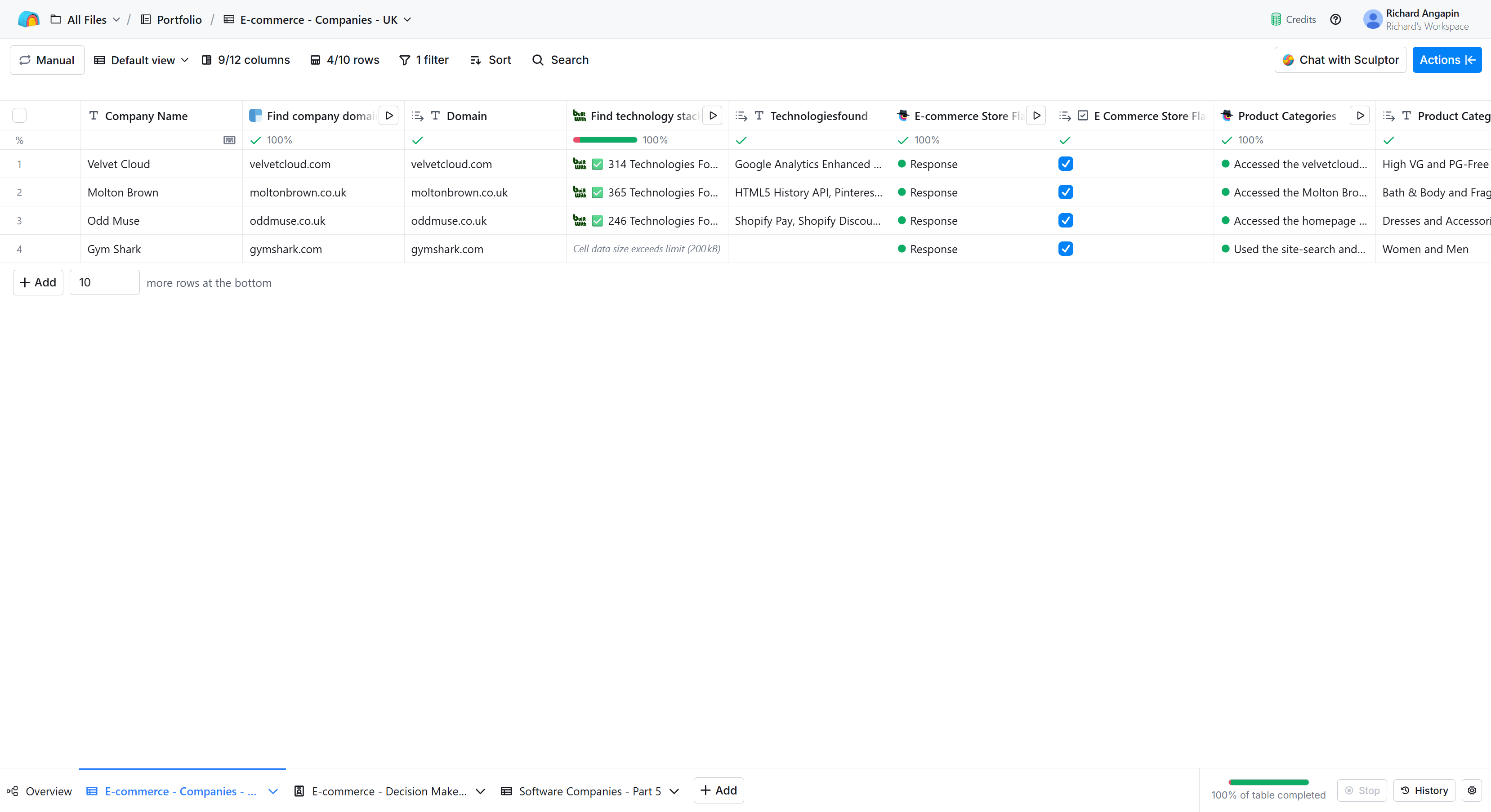
Starting with just company names, I used Clearbit's domain finder to resolve all 10 domains at zero credit cost. This also pulled LinkedIn URLs automatically, which saved a separate enrichment step later.
E-commerce qualification
Not all 10 companies were actually e-commerce stores. I ran BuiltWith's technology stack detection and built a formula that checks the response against known e-commerce platforms: Shopify, WooCommerce, Magento, BigCommerce, PrestaShop, and others. Each company gets flagged TRUE or FALSE.
Result: 4 out of 10 qualified as genuine e-commerce operations (Velvet Cloud, Molton Brown, Odd Muse, Gymshark). I applied a filter so all downstream enrichments only ran on qualified rows, preserving credits for where they mattered.
I also built a secondary qualification method using a Claygent prompt that actually visits the website and looks for purchase indicators rather than relying purely on tech stack detection. Two approaches to the same problem, each with different tradeoffs: BuiltWith is faster and more structured, the Claygent catches edge cases where stores use custom platforms.
Claygent prompt — e-commerce qualification:
#CONTEXT#
You are an AI-powered web scraper tasked with verifying if a company's
website operates as an e-commerce store based on the provided domain.

#OBJECTIVE#
Visit the website at the provided domain and determine if it is an
e-commerce store. Return only TRUE or FALSE.

#INSTRUCTIONS#
1. Navigation:
   - Go directly to the homepage for the domain. If the value is missing
     or invalid, return FALSE.
   - If redirected (e.g., to a country or language subdomain), follow the
     redirect and continue analysis on the final landing site.

2. Evidence of selling physical products online:
   - Look for a visible shop/store/catalog section with product listings.
   - Verify product detail pages that clearly show product names and prices.
   - Identify common e-commerce indicators: "Add to cart", "Buy now",
     "Checkout", cart icon with item count, basket, or similar.

3. Cart and checkout verification (no form filling):
   - Do NOT log in, type into fields, or submit forms.
   - You may follow links to cart or checkout pages if publicly accessible,
     but do not perform authenticated actions.
   - Presence of functional cart/checkout pages or buttons/links is sufficient.

4. Handling special cases:
   - If the site only collects leads, offers services, or provides catalogs
     without prices or purchasing flow, return FALSE.
   - If the site sells only digital downloads without cart/checkout evidence,
     return FALSE.
   - If the site is down, blocked, paywalled, or inaccessible, return FALSE.
   - If the site links to external marketplaces (e.g., Amazon, Etsy) without
     an on-site cart/checkout, return FALSE.

5. Output format:
   - Return exactly one of the following, with no extra text: TRUE or FALSE.
People pipeline
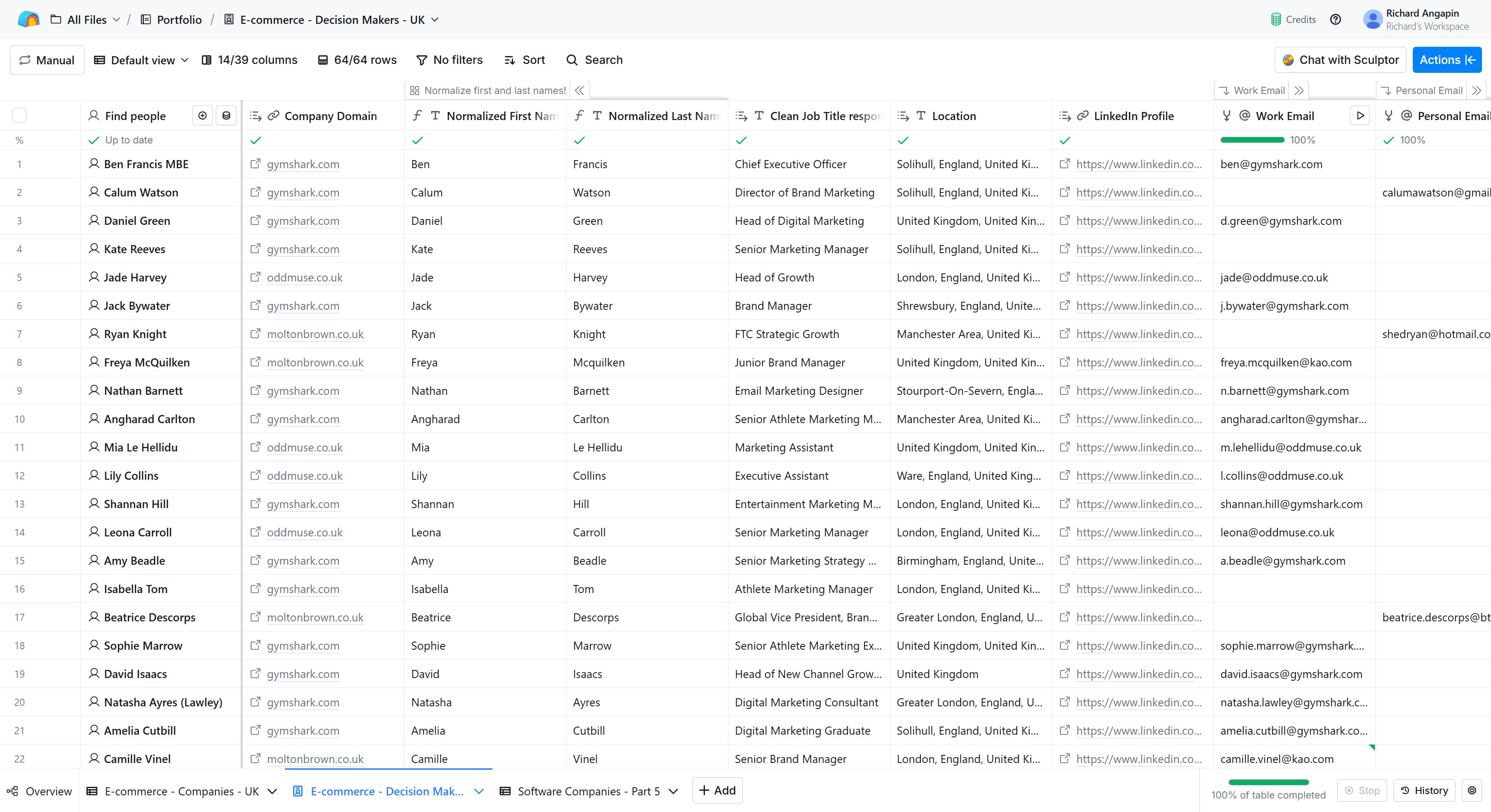
Using Clay's "Find People at These Companies," I pulled 64 decision makers across the 4 qualified companies, filtered to CEO, CMO, Marketing Manager, Head of Growth, and SEO Manager roles in the United Kingdom.
For email enrichment, I built a waterfall sequence: Hunter, then Prospeo, Datagma, Icypeas, and finally Dropcontact. This yielded 42 verified emails out of 64 contacts — a 65.6% coverage rate.
For the 22 contacts without work emails, I documented a coverage strategy rather than burning credits on diminishing returns:
- Personal email enrichment for high-value contacts
- LinkedIn URL export for outreach via HeyReach or InMail
- Phone number enrichment for C-level executives
- Parent company email domains (e.g., Molton Brown contacts reachable via @kao.com)
Data cleaning ran through three layers. First, an AI Formula prompt to strip noise from LinkedIn job titles:
AI Formula prompt — job title cleaning:
I will give you a LinkedIn title that needs to be cleaned, so that it
only contains the job title. It is possible that the LinkedIn title
includes unnecessary information besides a job title that should be
deleted. Shorten the title so it just includes a job title without
changing the responsibility of the title. This is the job title I want
you to clean: {{Clean Job Title response}}
On top of that, Clay's built-in normalizers for first/last names and company names handled the rest of the data hygiene.
Personalization
Two prompts here, and the architecture matters as much as the prompts themselves.
Product categories ran as a Claygent enrichment on the Companies table, not the People table. That is 4 rows enriched instead of 64. I then used Clay's table lookup to pull categories into every contact row for free. Same data, 94% fewer credits.
Claygent prompt — product categories:
Visit this e-commerce website: {{domain}}

Browse the homepage and navigation menu to identify 2 main product
categories they sell.

Return EXACTLY in this format (nothing else):
{{Category1}} and {{Category2}}

Examples of good output:
- "Activewear and Accessories"
- "Tees and Leggings"
- "Bath Products and Skincare"
- "Fashion and Dresses"

Keep category names SHORT (1-2 words each).
Use product category names you find on their website.
If you cannot access the website or find categories, return:
"Products and Accessories"
The opening line prompt was a free AI Formula that combines product categories with location data into conversational copy. The location handling matters here — the prompt converts formal geographic data ("United Kingdom, United Kingdom") into natural phrasing ("the UK").
AI Formula prompt — opening lines:
Create a conversational cold email opening line.

Company: {{company name}}
Products: {{product categories}}
Location: {{location}}

Format required:
"I know you guys sell {{compliment}} {{product}} in {{location}}"

Instructions:

1. COMPLIMENT - choose ONE word that fits the brand:
   - Luxury/high-end brands: "luxury" or "premium"
   - Athletic/fitness brands: "quality" or "top-tier"
   - Fashion brands: "stylish" or "quality"
   - General: "great" or "excellent"

2. PRODUCT - simplify the Product Categories intelligently:
   - "Women and Men" -> "activewear" or "apparel"
   - "Bridal and What's New" -> "bridal wear"
   - "Bath & Body and Fragrance" -> "bath & body products"
   - "E-Liquids and Beverage" -> "e-liquids"
   - "Activewear and Accessories" -> "activewear"
   - "Dresses and Fashion" -> "fashion"

   Rules:
   - Make it 1-3 words max
   - Keep it conversational
   - Don't just use "women" alone - add context like "women's apparel"
   - Combine both categories into ONE product type that makes sense

3. LOCATION - simplify to natural form:
   - "United Kingdom" or "UK" -> "the UK"
   - "United States" -> "the States"
   - City names (London, Manchester) -> use the city
   - "England" -> "England"

Return ONLY the opening line. No quotes. No extra text.
Example output: "I know you guys sell great bath & body products in the UK"
Key decisions and tradeoffs
Credit allocation: Around 330 credits total. The biggest spend was the email waterfall, which is where credit investment has the highest direct impact on campaign viability. Domain enrichment and tech stack detection were the other unavoidable costs. Personalization ran mostly free through AI Formulas and smart table architecture.
Qualification before enrichment: Filtering from 10 companies down to 4 before running the people finder and email waterfall saved roughly 60% of what the pipeline would have cost if run unfiltered. This is the single most impactful architectural decision in any Clay workflow.
Company-level vs. contact-level enrichment: Running product categories on 4 company rows instead of 64 contact rows, then using table lookups, is a pattern that scales. At 1,000 contacts across 50 companies, the savings become enormous.
Waterfall depth: Five email providers is aggressive for a 64-person list, but the goal was maximum coverage. In production, I would tune the waterfall depth based on the marginal cost per additional verified email at each stage.
Tools used
Clay (core platform), Clearbit (domain resolution), BuiltWith (technology detection), Hunter, Prospeo, Datagma, Icypeas, Dropcontact (email waterfall), Clay AI Formulas and Claygent (qualification, cleaning, personalization).
Video walkthrough
Coming soon — full walkthrough of the pipeline, enrichment logic, and key architectural decisions.